Alarm Clock
- 4.2
- Rating
- 1.00M
- Installs
- Free
- Price
 Analysis by App-foxy
Waking up on time sounds simple until the same alarm becomes easy to ignore, a timer is needed in the middle of a busy day, or a changing schedule makes the phone’s default clock feel too limited. I spent time with Alarm Clock from Alarm S25 to see whether it could become a dependable daily tool rather than something that feels useful for a week and then disappears into a folder. My overall impression is positive: it is a straightforward productivity app built around alarms, timers, and wake-up routines, with little distraction between opening it and setting a reminder.
The app is free, rated for Everyone, and works on Android devices running version 7.0 or later. It reached its current version, 3.4, after its release on January 5, 2025. Its audience is already fairly broad, with more than a million installs and an average score of 4.2 from roughly two and a half thousand ratings. Those figures suggest a useful level of adoption, but they do not tell me whether it will fit your habits. For that, the important question is how well it holds up after the first burst of interest.
What the first week feels like
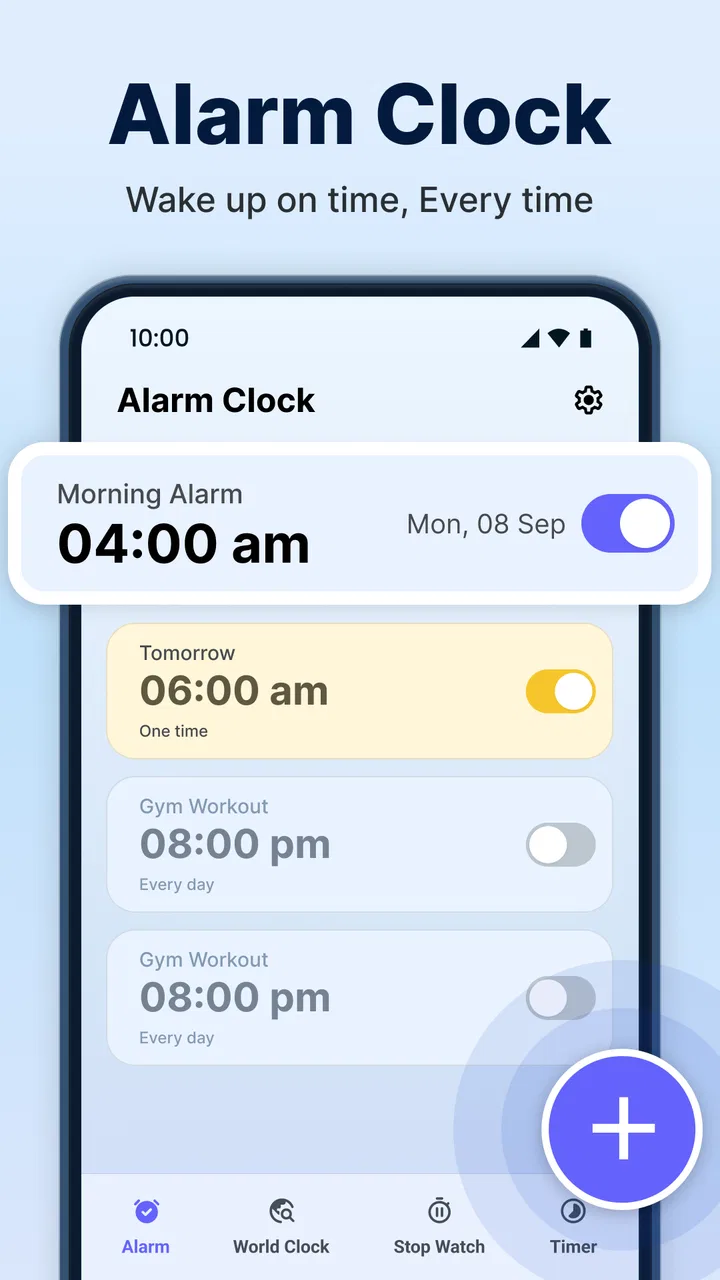
My first reaction was that Alarm Clock keeps its purpose visible. It is not trying to become a full planner, habit tracker, calendar, or wellness dashboard. That focus helps when I want to create a wake-up alarm quickly or use a timer without searching through unrelated tools. The experience feels better suited to people who prefer a dedicated place for time-based tasks instead of combining alarms with a crowded calendar.
You May Also Like

 Blood Strike: 2.5 Anniversary
Blood Strike’s Loadouts Turn Every Drop Into a Tactical Gamble
A close look at Blood Strike’s custom loadouts: how fast access to signature weapons reshapes its battle royale rhythm, rewards preparation, and narrows the gap between fights.

 Pandora - Music & Podcasts
Pandora’s Music Is Easy to Start, but Harder to Recover
Pandora’s strength is its low-effort path from a seed to a station. Its weak spot is how much confidence it asks you to place in connection, setup, and quiet recovery.

 8 Ball Pool
 Is Built on Rivalries, Rematches, and Routine
A close look at the rivalries, rematches, shared routines, and unanswered safety questions that turn a quick pool match into a persistent mobile community.

 Samsung Music
’s Quiet Strength Is Playing What You Already Own
Its reach comes less from spectacle than from dependable access to a personal library. That simplicity is both the app’s strongest retention engine and its ceiling.

 AccuWeather: Weather Radar
AccuWeather Review: A Quick, Clear Forecast for Everyday Decisions
For everyday plans, the best forecast is the one you can understand quickly. AccuWeather makes rain timing, radar, and local conditions easy to act on, with a few trade-offs.

 Hill Climb Racing
Why Hill Climb Racing Still Turns Crashes Into One More Run
A tiny car, a bumpy hill and one more upgrade: Hill Climb Racing keeps resurfacing because its simple chaos makes every near-miss feel personal.
More From Our News Desk



The first week is where an app like this has an obvious advantage over relying entirely on the system clock. A dedicated alarm screen encourages me to think in terms of routines: a weekday wake-up, a different weekend time, a short cooking timer, or a reminder before leaving home. I found that separation useful because an alarm is usually something I need to hear at a specific moment, while a calendar event is something I need to remember in relation to a schedule.
That distinction matters in a realistic morning routine. I might set a wake-up alarm for workdays, use a timer while preparing breakfast, and create another reminder for when I need to leave. Keeping those actions in one focused app reduces the chance that I will open a general calendar, get distracted by other appointments, and forget why I picked up the phone. The practical strength is not novelty; it is reducing the number of steps between intention and action.
I also like the way a dedicated alarm tool can make recurring behavior more visible. When I review the alarms I actually use, I can spot whether I am maintaining a stable routine or repeatedly changing it. That small moment of awareness is more valuable than adding a dozen alarms that I never check. My recommendation is to begin with only the alarms that solve a real problem, then add more after a few days of use.
Useful habits to establish immediately
The most important setup habit is to give each alarm a clear purpose. A label such as “leave for the train” is more useful than a vague label like “alarm,” especially when several entries appear together. Clear names make the list easier to audit and reduce the risk of disabling the wrong item during a tired morning.
I would also keep wake-up alarms separate from short timers in my mental routine. A wake-up alarm usually belongs to a recurring pattern, while a timer is temporary. Mixing both carelessly can create clutter and make the app feel less trustworthy. After using a timer, I would make a point of checking that it is no longer needed rather than letting temporary tasks accumulate.
Another non-obvious tip is to test an alarm during the day before trusting it for an important morning. This is not because Alarm Clock is complicated, but because every phone handles sound, notifications, battery behavior, and interruptions through its own system settings. A short daytime test lets me confirm that the selected sound is noticeable, the volume is appropriate, and the phone behaves as expected before I depend on it for work or travel.
That test also helps people who sleep through gentle alarms. Instead of immediately creating several overlapping alarms, I would first adjust the routine around one clearly identifiable wake-up point. Multiple alarms can provide reassurance, but they can also train me to ignore the first one. The app can support a schedule, but the quality of the habit still depends on how deliberately I use it.
Why it can remain useful from month to month
After the first week, an alarm app earns its place through repetition. Alarm Clock has a reasonable chance of staying installed because its core jobs recur naturally: waking up, measuring a task, and managing a changing daily schedule. I do not need to invent reasons to open it. The value appears whenever a routine shifts, a temporary timer is needed, or I want to keep a time-based task separate from other phone activity.
For someone with a stable weekday routine, the app may become almost invisible, and that is a good outcome. I would rather have an alarm tool that quietly does its job than one that constantly asks for attention. The lasting benefit comes from dependable access to the same small set of actions, not from checking the app for entertainment or collecting complicated statistics.
It is particularly suitable for people whose schedule changes across the week. Students, shift workers, parents, and anyone who alternates between home and office routines may find a dedicated alarm list easier to manage than repeatedly editing one default alarm. The app is also useful for ordinary household tasks: timing laundry, allowing food to cool, limiting a study session, or remembering when to start getting ready.
Still, I would not treat it as a replacement for every scheduling tool. If your day depends on meetings, locations, shared calendars, project deadlines, or detailed task management, a calendar or task manager will remain more appropriate. Alarm Clock is strongest when the desired result is an alert at a chosen time. It is weaker when the real need is context, collaboration, notes, or a chain of dependent tasks.
This is where it compares favorably with the usual alternatives but also reveals its boundaries. The built-in phone clock is often enough for one occasional alarm, and a calendar is better for appointments. A general reminder app can be better for tasks that need text, checklists, or follow-up. Alarm Clock sits between those options: more focused than a calendar, more time-oriented than a task list, and potentially easier to return to than a collection of unrelated reminders.
Recurring value depends on restraint
I think the best long-term workflow is deliberately small. I would keep recurring alarms for genuine routines and use timers for tasks that end after a single interval. Once a week, I would scan the list and remove or disable anything connected to an old schedule. This simple review prevents the app from becoming a wall of nearly identical entries.
That weekly check is one of the clearest ways to preserve trust. If I see alarms for a previous job, an old class schedule, and several abandoned experiments, I am less likely to believe the list at a glance. A clean alarm screen is not just visually pleasant; it lowers the chance of a missed or unwanted alert.
There is also a useful trade-off between redundancy and calm. A person who must wake up for an important appointment may want a backup alarm, but using backups every day can make mornings noisier and encourage postponement. I would reserve extra alarms for exceptional situations rather than turning every morning into a sequence of interruptions.
For timers, I would use descriptive labels and start them only when the task begins. That sounds obvious, but it prevents a common failure: setting a timer early, getting distracted, and then forgetting what the alert was supposed to mean. The app can measure the interval, but I still need to connect that interval to a clear action.
The maintenance burden is small, but real
Alarm Clock does not demand the kind of ongoing management associated with a full productivity suite. There is no reason to maintain projects, tags, notes, or elaborate dashboards just to use its main purpose. That low maintenance is one of its strongest arguments for people who want a practical utility rather than another system to organize.
However, “simple” does not mean maintenance-free. The main responsibility is reviewing recurring alarms whenever life changes. A new work start time, holiday, travel day, or change in sleeping pattern can make an old alarm actively inconvenient. I would update the schedule as soon as the change becomes permanent instead of tolerating several days of wrong alerts.
Sound and phone behavior also deserve occasional attention. I would check the phone’s volume and notification settings after major system changes, when switching sound profiles, or before relying on the app for an important morning. The app is only one part of the alert chain; the device’s broader settings can affect whether an alarm is heard or noticed.
Battery-saving behavior is another reason to test rather than assume. Different Android phones manage background activity differently, especially when an app has not been opened recently. I would make sure Alarm Clock is allowed to operate normally under my phone’s own battery controls and then perform a daytime test. This is a practical precaution, not a criticism unique to this app, but it is essential for any alarm application.
The same applies when moving to a new phone. I would not assume that every alarm arrangement will transfer exactly as I expect. Before the first important morning after changing devices, I would recreate or verify the alarms and run a test. That small bit of preparation is more valuable than discovering a missing routine at bedtime.
Where the routine can become tiring
The biggest source of fatigue is alert overload. An app that makes alarms easy to create can also make it easy to create too many. At first, extra reminders feel like control. Over time, repeated sounds become background noise, and I may begin dismissing them without processing the message. The solution is to treat every alarm as a commitment: if it does not lead to a useful action, it probably should not remain active.
Another point of friction is the difference between an alarm and a reminder. An alarm is intentionally interruptive. That is helpful for waking up or ending a timed task, but it is excessive for something that only needs a quiet note during the day. When I use the app for every small thought, it starts competing with the phone’s notification system and my calendar. I get better results when I reserve it for events where timing matters more than context.
People who need advanced scheduling logic may also outgrow it. If you want alerts based on location, a detailed work calendar, shared household coordination, or a multi-step automation, a specialized tool will likely be a better match. Alarm Clock’s focused design is an advantage for basic time control, but that same focus means it should not be judged as a complete personal assistant.
There can also be psychological fatigue from repeated wake-up alarms. The app can help establish a consistent signal, but it cannot decide whether the chosen time is realistic or whether the user is getting enough rest. If I constantly move alarms later, add backups, and dismiss alerts half-awake, the problem is probably the routine rather than the interface. In that situation, changing bedtime habits may help more than adding another alarm.
Who should keep it installed?
I would recommend Alarm Clock to anyone who wants a focused, free tool for wake-up alarms and timers without committing to a larger productivity platform. It is a good fit for people who value a separate alarm workspace, regularly need short countdowns, or have a schedule that changes often enough to make the default clock inconvenient.
It is also a sensible choice for users who prefer a simple interface and do not want to build a complicated system. The Everyone content rating makes it suitable for a broad audience, including households looking for a basic time-management utility. The developer, Alarm S25, has kept the product’s identity centered on the everyday jobs most people actually need from this type of app.
I would tell a friend to skip it if the phone’s built-in clock already handles every alarm comfortably and they rarely use timers. There is no need to install a separate tool simply because it exists. I would also point someone toward a calendar, reminder manager, or automation app if their main requirement involves appointments, location triggers, shared schedules, or detailed task information.
For users who are sensitive to sound or easily overwhelmed by notifications, I would suggest starting cautiously. Create one important alarm and one practical timer, test both during the day, and use them for a week before expanding the setup. That approach reveals whether the app supports a healthier routine or merely adds more interruptions.
My long-term verdict
After the novelty fades, Alarm Clock remains useful because its purpose is naturally recurring. It does not need a stream of new content or elaborate features to justify its place on my phone. When I keep the alarm list clean, separate recurring wake-ups from temporary timers, and review settings after schedule or device changes, it becomes a quiet piece of daily infrastructure.
Its limitations are equally clear. It is not the right answer for complex planning, shared organization, location-based reminders, or people who want a full productivity ecosystem. It also cannot compensate for an unrealistic sleep routine, careless volume settings, or an alarm list filled with abandoned entries. Those boundaries do not make it a poor app; they make its best use case more specific.
The 4.2 average from around two and a half thousand ratings reflects a generally favorable reception, while the install count of over a million shows that the concept has reached many Android users. I would not choose it because of those figures alone. I would choose it because the app gives ordinary alarms and timers a focused home, costs nothing, and can support a reliable habit without demanding a complicated setup.
My final recommendation is to keep it if it makes your mornings or timed tasks more dependable, not merely because it offers another place to set an alarm. In my experience, its lasting value comes from disciplined use: a short list, clear labels, occasional maintenance, and a quick test whenever the phone or schedule changes. Used that way, Alarm Clock earns a permanent place as a practical productivity companion rather than becoming another forgotten download.
FAQs for Alarm Clock
01What features does the Alarm Clock app offer?
The Alarm Clock app provides a variety of features to enhance your waking routine. It includes customizable alarm tones, a snooze function, and the ability to set multiple alarms. Additional features may include weather updates, a sleep tracker, and integration with music streaming services to wake you up with your favorite tunes.
02Is the Alarm Clock app free to use?
The Alarm Clock app is generally free to download with basic features available at no charge. However, there might be in-app purchases or a premium version available, offering additional features such as ad-free usage, advanced alarm customization, and exclusive alarm tones. Check the app store for specific pricing details.
03Can I use the Alarm Clock app offline?
Yes, the Alarm Clock app can function offline for basic alarm settings once it is downloaded and installed. However, some features, such as weather updates or streaming music for alarms, may require an internet connection to function properly. Ensure your device's settings allow the app to operate offline for alarms.
04Does the Alarm Clock app drain battery quickly?
The Alarm Clock app is designed to be energy efficient, but active features like a sleep tracker or continuous music playback may impact battery life more significantly. To minimize battery use, ensure your device is optimized for background process management and set alarms without additional features like vibrations or long-duration sounds.
05Is the Alarm Clock app compatible with smart devices?
The Alarm Clock app often includes compatibility with smart devices, such as smartwatches and home assistants. This allows you to set and manage alarms from various devices seamlessly. Check the app description for specific compatibility details and ensure your smart devices support integration with the app.
Pros
- Customizable alarm tones enhance personalization.
- Snooze options help manage morning routines.
- User-friendly interface for easy navigation.
- Supports multiple alarms for varied schedules.
- Vibration settings for discreet alerts.
Cons
- Limited free features without premium upgrade.
- Ads can be intrusive during use.
- No integration with smart assistants.
- Battery consumption can be high.
- Missing advanced sleep tracking features.

Alarm Clock
Gallery